
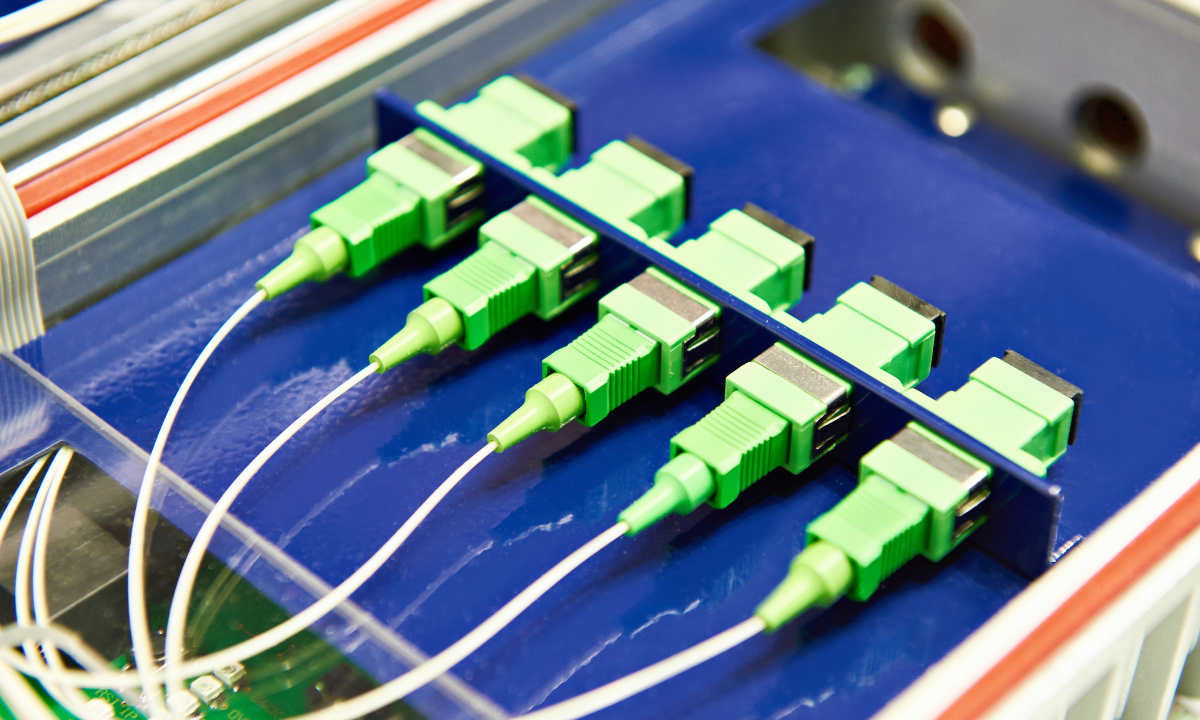
1. What is an optical fiber connector?
An optical fiber connector is a device used to join two fiber optic cables or to connect a fiber optic cable to a device (e.g., switch, router, or transceiver). It ensures precise alignment of the fiber cores to allow efficient light transmission with minimal loss.
2. Why are optical fiber connectors important?
- Interconnectivity: They enable quick and reliable connections between fiber optic cables and devices.
- Flexibility: They allow for easy reconfiguration of network setups.
- Maintenance: They simplify troubleshooting and repairs by enabling easy disconnection and reconnection.
- Performance: High-quality connectors minimize signal loss (insertion loss) and reflection (return loss).
3. What are the key components of an optical fiber connector?
- Ferrule: A cylindrical structure (usually made of ceramic, metal, or plastic) that holds the fiber in place and ensures precise alignment.
- Connector Body: The outer shell that protects the ferrule and fiber.
- Coupling Mechanism: A mechanism (e.g., push-pull, twist-lock) to secure the connector to a port or adapter.
- Boot: A protective cover that prevents the cable from bending too sharply at the connection point.
4. What are the most common types of optical fiber connectors?
- LC (Lucent Connector):
- Small form factor, ideal for high-density applications.
- Uses a 1.25 mm ferrule.
- Commonly used in data centers and telecom networks.
- SC (Subscriber Connector):
- Square-shaped, push-pull design.
- Uses a 2.5 mm ferrule.
- Popular in LANs and CATV networks.
- ST (Straight Tip):
- Bayonet-style coupling mechanism.
- Uses a 2.5 mm ferrule.
- Often used in older networks and industrial applications.
- FC (Ferrule Connector):
- Screw-on coupling mechanism for secure connections.
- Uses a 2.5 mm ferrule.
- Commonly used in high-vibration environments and test equipment.
- MPO/MTP (Multi-Fiber Push-On/Pull-Off):
- Designed for multi-fiber cables (e.g., 12, 24, or 48 fibers).
- Used in high-density data centers and parallel optic applications.
- MTRJ (Mechanical Transfer Registered Jack):
- Combines two fibers in a single connector.
- Compact design, often used in networking equipment.
5. What is insertion loss and return loss?
- Insertion Loss: The amount of signal loss that occurs when light passes through a connector. Lower insertion loss means better performance (typically < 0.3 dB for high-quality connectors).
- Return Loss: The amount of light reflected back toward the source. Higher return loss is better (typically > 50 dB for high-quality connectors).
6. What are the key considerations when choosing a fiber optic connector?
- Application: Different connectors are suited for different environments (e.g., data centers, telecom, industrial).
- Density: High-density environments may require smaller connectors like LC or MTP.
- Durability: Consider the connector’s ability to withstand environmental factors like dust, moisture, and vibration.
- Cost: Some connectors are more expensive due to their design or materials.
- Compatibility: Ensure the connector is compatible with existing equipment and cables.
7. What are the challenges of using fiber optic connectors?
- Precision: Connectors require precise alignment to minimize signal loss.
- Contamination: Dust or dirt on the connector end-face can cause signal degradation.
- Fragility: Fiber optic connectors are more delicate than copper connectors and require careful handling.
- Cost: High-quality connectors and installation tools can be expensive.
8. How do you clean and maintain fiber optic connectors?
- Inspection: Use a fiber microscope to check for dirt, scratches, or damage.
- Cleaning: Use lint-free wipes and isopropyl alcohol or specialized cleaning tools (e.g., cassette cleaners, click pens).
- Protection: Always use dust caps when connectors are not in use.
- Handling: Avoid touching the end-face of the connector to prevent contamination.
9. What are the differences between single-mode and multi-mode connectors?
- Single-Mode Connectors: Designed for long-distance, high-bandwidth applications. They typically use smaller ferrules (e.g., 1.25 mm for LC).
- Multi-Mode Connectors: Designed for shorter distances. They often use larger ferrules (e.g., 2.5 mm for SC or ST).
- Compatibility: Single-mode and multi-mode connectors are not interchangeable due to differences in core size and alignment.
10. What are the future trends in fiber optic connectors?
- Higher Density: Development of smaller connectors to support high-density environments.
- Automation: Use of robotic systems for connector polishing and inspection.
- Advanced Materials: Use of durable materials to improve connector lifespan.
- Smart Connectors: Integration of sensors to monitor performance and detect faults.
- Standardization: Adoption of universal standards to improve compatibility and reduce costs.
Primer 101: Basics of Optical Fiber Connectors
1. How do fiber optic connectors work?
Fiber optic connectors align the cores of two fibers to allow light to pass through with minimal loss. The ferrule ensures precise alignment, while the connector body and coupling mechanism provide stability and ease of use.
2. What are the key terms to know?
- Ferrule: The part of the connector that holds the fiber.
- Polish Type: The shape of the connector end-face (e.g., PC, UPC, APC).
- PC (Physical Contact): Flat polish, basic performance.
- UPC (Ultra Physical Contact): Curved polish, lower insertion loss and return loss.
- APC (Angled Physical Contact): Angled polish (8 degrees), highest return loss, used in high-performance applications.
3. What tools are needed for fiber optic connector installation?
- Cleaving Tool: To cut the fiber cleanly.
- Polishing Tool: To polish the connector end-face.
- Fiber Stripper: To remove the fiber coating.
- Inspection Microscope: To check the connector end-face.
- Cleaning Kit: To clean connectors and adapters.
4. What are the steps to install a fiber optic connector?
- Strip the fiber coating.
- Cleave the fiber to ensure a clean end.
- Insert the fiber into the connector ferrule.
- Secure the fiber with epoxy or a mechanical splice.
- Polish the connector end-face to ensure smooth light transmission.
- Inspect the connector using a microscope.
- Test the connector for insertion loss and return loss.
This FAQ and Primer 101 provide a detailed overview of optical fiber connectors, their types, uses, and best practices.